certidao.ua - certidão permanente online UA
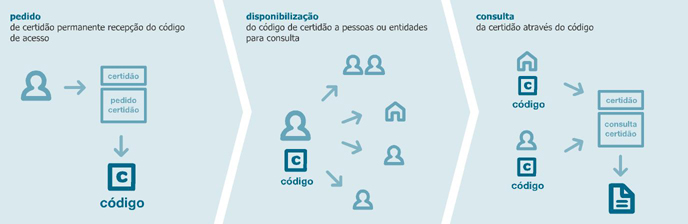
O acesso à ou às certidões faz-se com recurso a um código fornecido para o efeito pela UA.
Através deste sistema as certidões podem ser consultadas a todo o tempo, seja pelo titular dos dados, seja por terceiros a quem o código de acesso tenha sido legitimamente endossado e que tenham necessidade ou conveniência de comprovar a informação certificada.
|
|
Procedimento
O estudante requer o acesso à ou às certidões relevantes. Para tal é necessário entrar no sistema e aceder à sua área pessoal com as credenciais de utilizador universal UA ou através do cartão de cidadão e preencher o pedido de certidão. Uma vez efectuado o pagamento devido (consultar tabela de certidões) o acesso à certidão será imediatamente activado, sendo o seu titular notificado por email, e enviado por essa ocasião o correspondente código de acesso.
O acesso às certidões só pode ser requerido pelo titular dos dados a que a mesma se reporta.
Assim, sempre que o requerente necessitar de comprovar perante terceiros os factos constantes da certidão permanente, terá apenas que fornecer o código de acesso, não sendo assim necessário a sua disponibilização em suporte de papel.
O acesso à ou às certidões permanentes faz-se através do menu consultar, bastando para esse efeito introduzir o código de acesso fornecido ao (ou pelo) titular dos dados.
|
Certidão permanentemente disponível e actualizada
Este sistema disponibiliza em permanência, 24/24 horas, o acesso a todas as certidões cujo acesso tenha sido requerido, e enquanto o mesmo não caducar. O prazo de validade é de um ano. Dependendo da natureza da certidão, se houver alteração na situação do estudante a certidão reflectirá de imediato a situação actual. Por exemplo, tratando-se de uma certidão de aproveitamento a unidades curriculares, a certidão contemplará a todo o tempo todas as unidades curriculares com aprovação obtida após o pedido.
No final do prazo de validade de uma certidão o seu titular tem a possibilidade de efectuar a sua renovação por mais um ano.
Em qualquer momento o titular de uma certidão poderá pedir um novo código de acesso, circunstância que implicará, sem mais, a caducidade do código anteriormente fornecido.
Para mais informações consulte as nossas páginas de referência e consulte a nossa secção de ajuda aqui.
|